Ceci n’est pas Wordle devlog

Dec 18, 2023 (IST)
Show/Hide contents
Bonjour! Welcome to devlog 1 of 1: why I made a Wordle clone (and then another), as well as some tips and design choices.
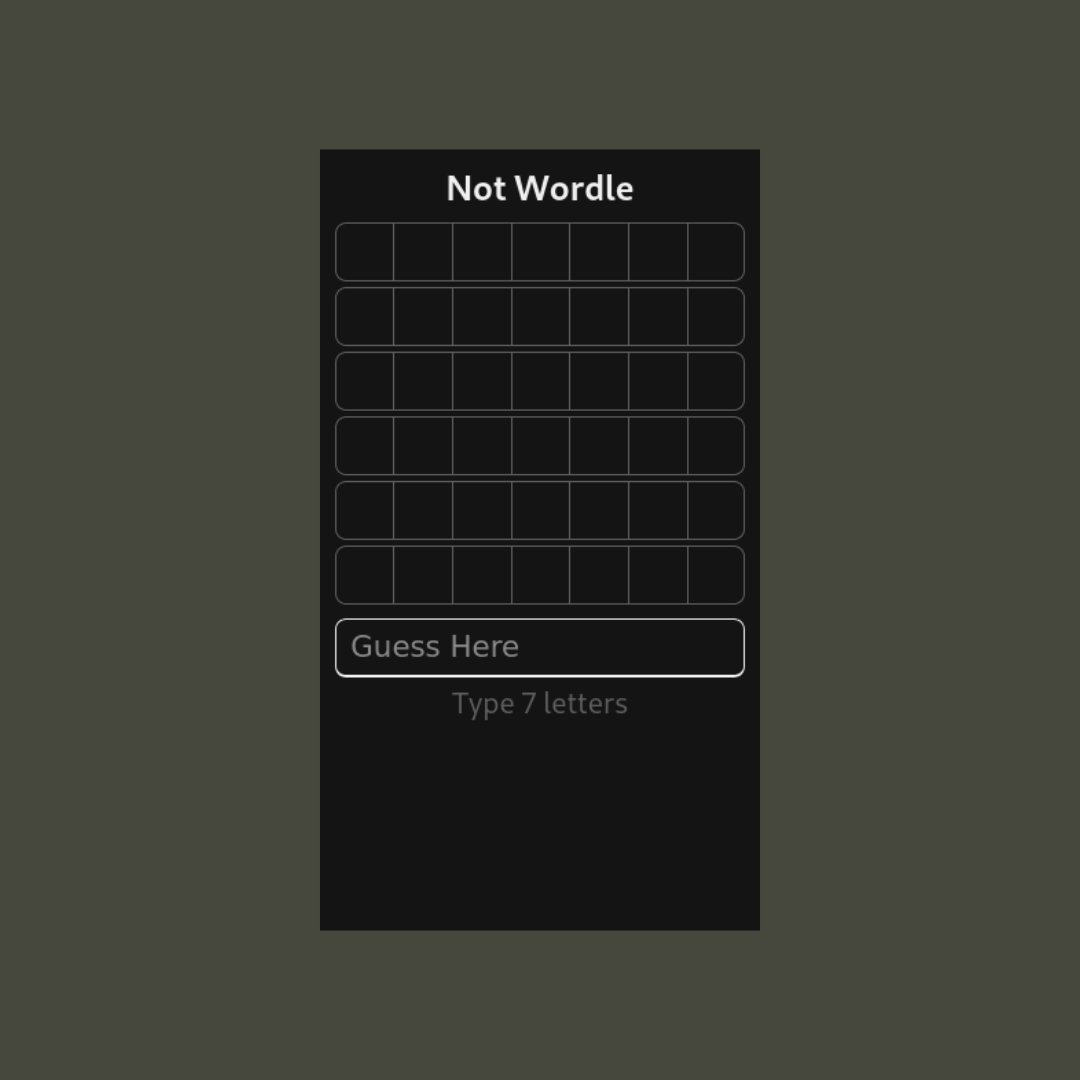 (Version 1, with a static grid and a single input field
for typing out your guess)
(Version 1, with a static grid and a single input field
for typing out your guess)
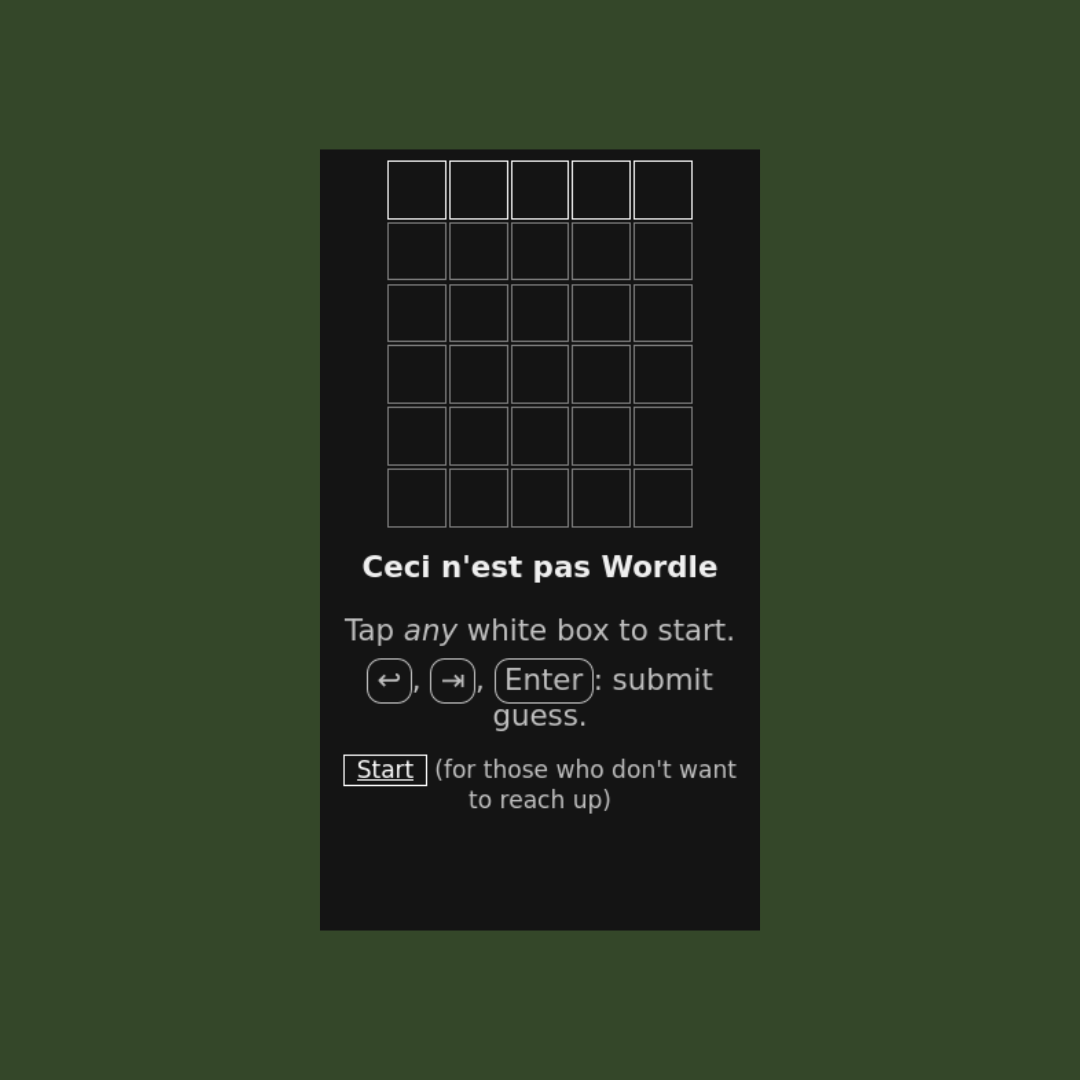 (Version 2, with a grid of input cells,
so you can type in letters directly in the grid)
(Version 2, with a grid of input cells,
so you can type in letters directly in the grid)
Try Ceci n’est pas Wordle! (version 2)
Here’s why I made it: basically, I was mad at a friend, and I didn’t want to just rant at him — I had to curse him in a nice way. After racking my brain for a day or two, I figured it out — I’d make him find out exactly what he was (a f***er, if you must know, since other words would be too long).
After that I couldn’t resist sharing it with other people (I obviously changed the word), because it’s quite fun to share something I made, plus I could pick a funny or silly word that referenced the day we had, or a random conversation or event.
(Btw, “ceci n’est pas” means “this is not”)
Anyway, here’s some little things I learnt as I worked on my clone(s), in rough order of usefulness.
Consider a custom keyboard or a single input🔗
When using the current (v2) design, it requires adding in some special handling for some keys, so that the focussed input automatically switches back and forth, which can cause issues, because some keyboards (on Android, at least) don’t like sharing what keys have been pressed.
The default keyboards work though (even on iOS).
So if you’re facing issues with handling input, or if you want to make it really robust, either you make a custom keyboard with divs, or you use a single input with a ‘submit’ button.
5 letters (or less)🔗
Longer than that starts to become quite hard to guess, and then your friends and family will just feel bad. It’s fine if you’re around to monitor and give hints though.
One reason is that when you think of a word, you need to count out the letters, and it becomes harder as you go.
I don’t think it’s that longer words are inherently harder, since they can give a chance to reveal more letters, but that might also contribute to the problem.
Show letters in the grid🔗
My first design had an input element for people to enter their guess and then it would add their guess to the grid above. This would cause confusion by having no response when trying to submit a guess, because it was hard to see that there were too few letters.
Here’s how it looked:
While there’s a counter at the bottom, it would either get covered up by the keyboard, or people would not think or realise that it updated.
Here’s the benefits of the design:
- See your guess in context, before submitting.
- Immediately see which letters are missing, and how many.
- Fill in the letters you know.
- Don’t delete the whole word to change your guess.
- Use less space on the grid.
Set height and width for cells🔗
This applies more to my initial design,
which used div elements instead of input fields.
If you’re using divs to show the grid, then empty cells just disappear.
Set a height and width anyway, so that it looks nice and consistent, instead of the (quite ugly) default style, which is too wide, and quite small (even if you increase base font size — you’ll have to change that as well).
Add a start button🔗
A start button at the bottom is nice, so that you can start the game without having to reach to the top of the screen, which is always awkward.
Don’t add a border for keyboard references🔗
There’s a minor issue in my version 2 screenshot: the keyboard references for the ‘enter’ key look like buttons, so some people try pressing those instead of the enter button on their keyboard.
Final design🔗
Give Ceci n’est pas Wordle a try!
Make your own🔗
You can just copy the HTML, change the WORD variable 1,
and then share it with someone!
Remember to pick a 5 letter word or less, unless you’re there to give hints.
look for const WORD = '<a-word>'